Your training, made personal

FACHS: AI Workout
Planner Based on
Your Gym Equipment

Your Gym. Your Goals. A Workout That Adapts.

FACHS connects your available gym equipment, training history, workout goals, and nearby food options to help you make smarter fitness decisions.

Built around the equipment, time, and goals you actually have.
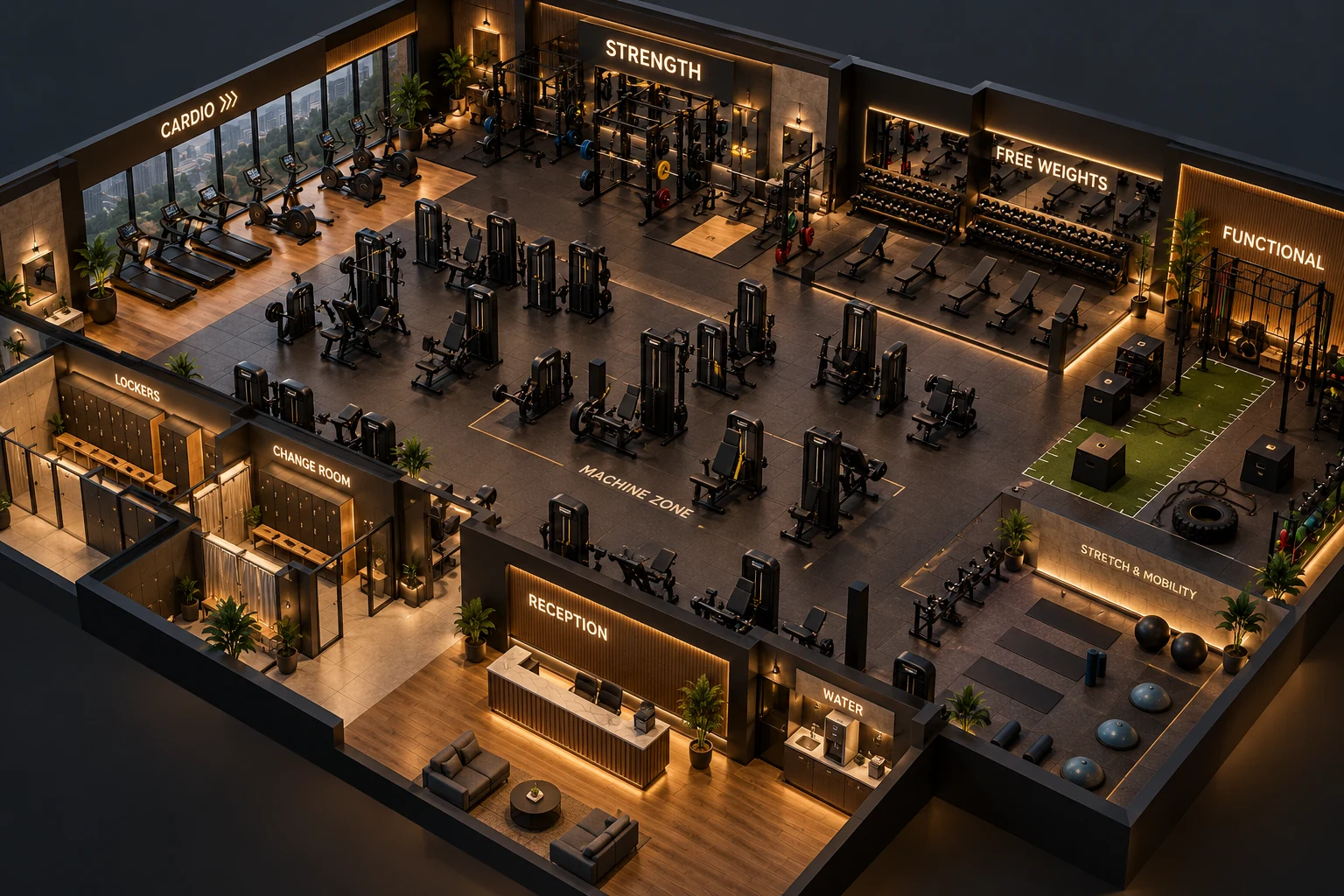
Illustrative isometric view of a modern gym with cardio, strength, and free-weight areas.
A plan shaped around your space
YOUR WORKOUTREADY

Pull day

Matched to your saved equipment

01Lat pulldownBack · Cable machine
02Dumbbell rowBack · Dumbbells
YOUR SETUPDumbbellsCableBench
✓Made for your gymEquipment-aware planning

Illustrative product preview

Explore FACHS
Equipment-aware workoutsFlexible training plansFood discovery, when configured

THE FACHS COMMUNITY

Current Hourly Active Users

A live-style snapshot of the community activity pattern throughout the day.

CURRENT HOURLY ACTIVE USERS 1 1 of 2,059 total users · 0.05% active Updates every 10 minutes

Less guesswork. More intention.

A fitness and nutrition planner
that starts with your real life.

Tell FACHS what you have, what you’re working toward, and how much time you can make. Your plan starts there.

01 / YOUR SPACE

Gym equipment workout planner

Use FACHS as an equipment-based workout generator: add the machines and weights you can access, then build sessions from available options. Image recognition can help identify equipment when its vision model is available.

See how planning works

02 / KEEP MOVING

Find exercise alternatives

If an exercise does not fit your setup, FACHS can suggest a substitute that keeps a similar movement intent and target muscle. It does not detect whether a machine is occupied.

Explore exercise alternatives

03 / AROUND YOU

Healthy food near me, with context

When a nearby menu provider is configured, explore real listings with options shaped by dietary preferences and budget. Menu availability can change; nutrition values may be estimates and should be checked with the restaurant.

How food discovery works

04 / YOUR RHYTHM

An adaptive workout planner

Workout plans can use your chosen split, available equipment, target muscles, session duration, and workout history to guide what comes next. Your plan follows its progression rules while offering recovery context from recent training.

Build your own rhythm
A modern gym floor plan with strength, cardio, and free-weight areas.
YOURGYMYOUR RULES
Start with what you haveYour equipment shapes the plan.

A simple way to begin

How FACHS
works for you.

A personalized workout planner should fit your setup—not ask you to start over every time you walk into a different gym.

  1. 01Set your directionChoose a goal, training level, weekly rhythm, and food preferences.
  2. 02Tell us what’s availableSelect equipment manually or scan an image when equipment recognition is configured.
  3. 03Train, log, adaptGenerate a session for your available time, record your work, and use your history to guide the next one.
Create your plan

SEE FACHS IN ACTION

Watch how it works.

Get a closer look at how FACHS helps you plan around your gym, equipment, and goals.

A NOTE ON FOOD DATA

Useful context. Honest about the details.

FACHS can filter meal suggestions using your diet, allergies, and budget. Nearby discovery depends on an active places/menu provider. Protein and calorie figures may be estimated from available menu data—not independently verified—and listings can change.

Set your preferences

A better starting point

Small guides for
real gym decisions.

Practical notes built into the page—no empty blog, no filler.

01 / EQUIPMENT

Build around what’s available

Start with the target you want to train, list the equipment you can actually use, then choose movements that fit both. If a machine is missing, use a substitute for the same movement and target rather than forcing the original exercise.

Equipment-aware planning
02 / ALTERNATIVES

When a station is taken

Choose an alternative that keeps the target muscle and movement pattern close to the original. A dumbbell row can cover a similar pull when a cable row is unavailable; adjust the load to what you can control.

Same-muscle substitutions
03 / FOOD

Look beyond a “high-protein” label

Compare the menu description, ingredients, portion, and price. Restaurant nutrition can vary; treat estimated calories and protein as a guide and ask the restaurant about ingredients or allergens.

Food discovery details

Good questions

A few things
to know.

Clear expectations make a better plan.

Does FACHS work if my gym has different equipment?

Yes. Add the machines and weights you can use to your equipment list. Workout sessions use that list with your selected goals, split, and available time; you can update it when your setup changes.

Can Live Scan tell whether equipment is occupied and analyze gym crowds?

Yes. Live Scan has a separate Crowd Analysis section powered by FACHS crowd analysis. It estimates the number of people in view, shows the live crowd level, and can flag equipment as possibly occupied when a detected person overlaps a detected machine. This is a visual estimate, not a guaranteed availability check. Equipment recognition and crowd analysis remain separate sections.

Are nearby food and nutrition details verified?

Nearby suggestions require location access and a working places provider. If no nearby listings are returned, FACHS can still create a general meal plan. Menu availability changes, and nutrition values may be estimates; confirm details with the restaurant.

Can I change my training plan later?

Yes. Update your profile, training split, equipment, or session duration as your needs change. Workout selection follows your saved settings and history, and logged sets can help guide progression.

Is FACHS a medical or nutrition service?

No. FACHS provides fitness and general nutrition planning, not diagnosis or treatment. For medical conditions or individualized dietary care, consult a qualified health professional.

Free for now · Your call

What should FACHS
cost in the future?

FACHS is free to use right now. We may introduce pricing in the future, and we want to hear what you think would be fair. Drop your guess—no payment, account, or commitment required.

This is a community price guess, not an announced price or promise.

Enter a whole amount in Indian rupees (₹99–₹3,000).

Community average guess — Loading community guesses…

Make room for your next session

Start with the gym
you have today.

Your first plan begins with your goals, your gear, and your time.

Get Started
FACHS

FACHS SUPPORT

How can we help you?

Find clear answers about workouts, equipment scanning, nutrition, gym discovery, and your account.

Browse help topics below

01 / TRAINING

Workout plans & progress

WORKOUTS
How does FACHS create my workout plan?

FACHS uses the training details you provide, such as your goal, experience, preferred split, available equipment, training days, and session duration. Keep your profile and equipment list up to date so the plan reflects your current setup.

Can I change my workout split or equipment?

Yes. Open your profile or equipment settings and update the details that have changed. Your available choices may affect the exercises FACHS can recommend.

What happens if I miss a workout?

Workout plans follow daily progression rules. A session left unfinished from a previous day may expire when the plan advances. An expired session should not be counted as a workout completed today. Open your current workout plan to see the session available for the current day.

Why does FACHS say “Please come back tomorrow”?

This message can appear after today's workout has been recorded as complete. If you completed an older session today and the message appears unexpectedly, refresh the workout page. If it continues, report the issue with the date of the workout and the message shown.

How is workout progress calculated?

Progress reflects completed units in your selected training structure. The number and size of those units depend on the split, so different plans can move in different increments.

Can I edit a completed workout?

Workout editing options depend on the controls available in your workout history. Check the session details before leaving the workout screen.
02 / AI TOOLS

Equipment scanning & form checks

EQUIPMENT & AI
How do I scan gym equipment?

Open the equipment scan feature, allow camera access when your browser asks, and capture a clear image with the equipment visible. You can also manage equipment manually where that option is available.

Why was my equipment not detected?

Try better lighting, move closer, keep the equipment unobstructed, and capture one or a few items at a time. If scanning is unavailable, the recognition service may not be configured or temporarily reachable. You can select equipment manually instead.

Does equipment scanning know whether a machine is free?

Equipment recognition and crowd analysis are separate features. Crowd analysis can estimate people and possible equipment overlap in the camera view, but it cannot guarantee that a machine is available.

How do I troubleshoot camera access?

Use a supported browser, check that the site has camera permission, close other apps using the camera, and reload the page. Camera access generally requires a secure HTTPS connection.

How does exercise form feedback work?

When the form-checking feature is available, it uses camera input and pose information to provide exercise guidance. Keep your full movement visible and follow the on-screen setup instructions. Treat automated feedback as guidance, not a medical assessment.

03 / FOOD

Nutrition & food tracking

NUTRITION
How do I track packaged food?

Use the food scanner to look up a barcode or search by product name. Review the serving size and nutrition details before saving. If product information is missing, use manual entry and copy the values from the food label.

Are calorie and protein values always exact?

No. Values depend on the source and serving information. Some menu or food listings may contain estimates or incomplete data. Check the package label or restaurant information when accuracy matters.

Why can't I find nearby food?

Nearby discovery depends on location permission or a manually entered place, as well as an available places/menu provider. Check your location settings and try again. Listings and menus can change.

Can I set dietary preferences and allergies?

You can add dietary preferences and allergy information in your profile. Always review ingredients with the food provider before eating, especially when you have an allergy. Do not rely on an automatically generated listing as an allergy guarantee.

04 / YOUR GYM

Gym discovery & crowd information

GYM DISCOVERY
Why can't FACHS find a nearby gym?

Allow location access or search using a place name. Results depend on third-party map data and coverage, so some gyms may be missing or have incomplete details.

Are gym opening hours guaranteed?

No. Displayed hours depend on available listing data and may not include temporary changes or holiday schedules. Confirm directly with the gym before travelling.

How should I interpret crowd information?

Crowd information is an estimate based on available data or visual analysis, depending on the feature. It is not a live guarantee of occupancy, waiting time, or equipment availability.

05 / YOUR ACCOUNT

Login, privacy & security

ACCOUNT
I didn't receive my email verification or login code. What should I do?

Check that the email address is correct, look in spam or junk folders, and wait for the resend timer before requesting another code. If the code still does not arrive, try again later and report the issue.

How do I reset my password?

Choose “Forgot your password?” on the login screen, request a reset code, and follow the instructions to choose a new password.

How do I update my profile?

Open your profile or settings, choose the edit option, update your details, and save your changes.

Does FACHS provide medical advice?

No. FACHS is a fitness and general nutrition planning tool. It does not diagnose, treat, or replace advice from a qualified healthcare professional.

STILL NEED A HAND?

Something not working?

Share the issue details with the FACHS team so it can be investigated. Please do not include passwords, OTPs, or private health information.

This copies a report you can share through your usual support channel.

404 · Page not found

This page isn't
part of the plan.

That address may be outdated, or the page may have moved. Head back to FACHS and continue from there.

Welcome back

Adaptive workouts, nutrition, and gym check-in — built around what you actually have.

Verify your email

We sent a 6-digit verification code to

Check your spam folder.

Sign in with a code

We sent a one-time code to

Reset your password

We’ll email you a one-time reset code.

Choose a new password

Set up your plan

This tunes your workouts, nutrition targets, and equipment matching.

What equipment do you have?